A general guide to phone care and repair. For hardware damage, have your phone checked by a trusted technician.
Cracks, lines on the display, or an unresponsive touchscreen often prompt phone owners to ask for an LCD replacement. However, not all phone screens use LCD technology. During a service inspection, understanding the panel type and the component’s origin is just as important as identifying the cause of the problem before replacing the screen.
Original describes origin, while OLED describes technology
The term original refers to a component’s authenticity and origin, not its display technology. A phone’s original screen may use LCD or OLED, depending on the device’s design. Original and OLED are therefore not necessarily opposing choices: a screen can be both genuine and OLED.
In the marketplace, the original label is also applied to components with different histories, including screens taken from other devices or screens that have been repaired. That label alone is not enough to establish a panel’s condition. Ask whether the component is new, used, or refurbished, and which parts have been worked on. Packaging and stickers alone are not proof of authenticity.
How OLED and incell differ in everyday use
OLED produces light from its own pixels, so it does not need a separate backlight. When displaying black, the corresponding pixels can be switched off. Incell, meanwhile, is a design that integrates touch-sensing functionality into the panel structure; in replacement phone screen listings, the term commonly refers to incell LCDs, which still use a backlight.
These differences affect black levels, contrast, and how the display looks from an angle. However, an OLED label on the packaging does not automatically guarantee quality equal to the original screen. Color, brightness, touch response, and proper fit also depend on the component’s quality and compatibility.
If a phone originally used OLED and is fitted with an incell LCD replacement, the result will not be identical to the original design. Support for features such as an always-on display and an under-display fingerprint sensor needs to be confirmed. Do not assume all functions will remain the same simply because the screen turns on.
Recognize the symptoms and check safely
Cracked glass, dark patches, persistent lines, or areas that do not respond to touch are reasons to have the screen inspected. Impacts, pressure, and exposure to liquids are common causes of damage. However, a dark screen does not always mean the panel is faulty; a technician also needs to check for power problems, internal connection issues, and faults in the control circuitry.
For touch problems without physical damage, clean the surface with a dry microfiber cloth, make sure your hands are dry, and restart the phone. Remove external accessories that put pressure on the screen’s edges. If the problem occurs only while charging, stop using that charger and use charging equipment that meets the manufacturer’s specifications.
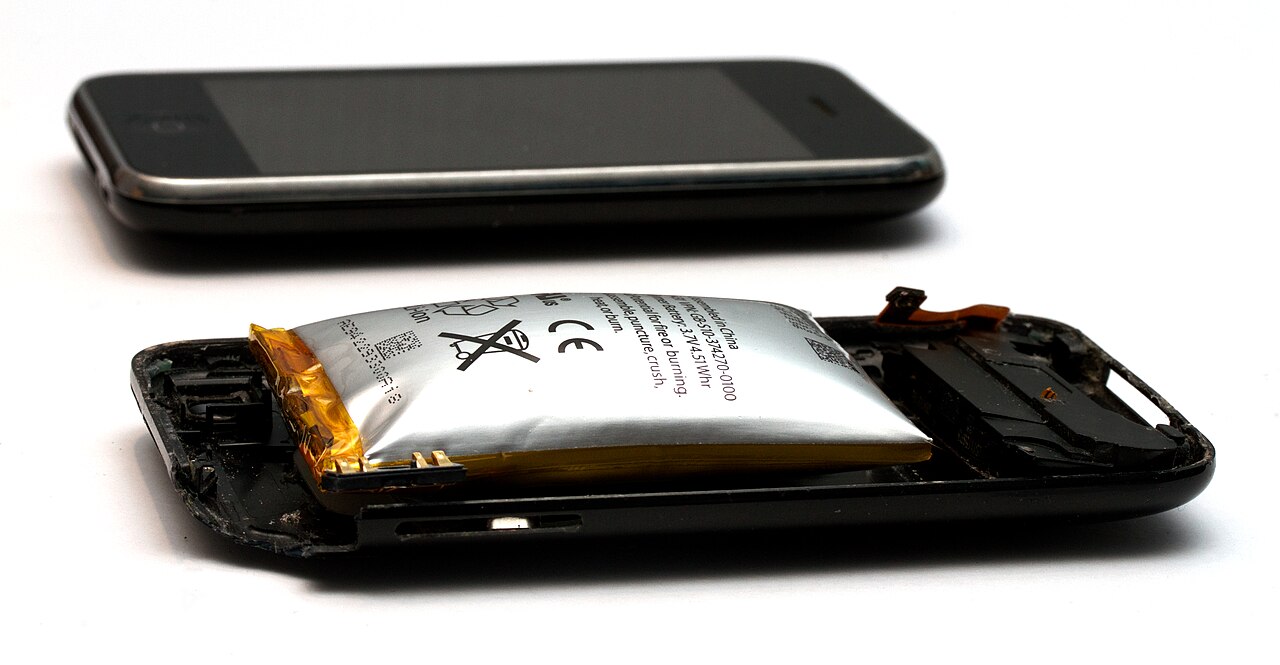
Back up your data while the phone is still usable. Do not press on dark patches, massage the screen, or heat it. If the screen is lifting, the body is bulging, the device is very hot, or it has recently been exposed to liquid, stop using it and do not charge it. These conditions require an inspection, not just a choice of replacement panel.
Confirm compatibility and test the installation
Before approving a replacement, ask the technician to confirm the device code, variant, component or flex cable code, and connector compatibility. Similar shape and size do not guarantee compatibility. Also ask which functions are supported and what the terms are for addressing any problems found after installation.
When collecting your phone, check white, gray, and black displays at a comfortable brightness. Try typing across the entire keyboard, dragging an icon across the screen, and testing multitouch input. Check the brightness settings, the proximity sensor during calls, and the fingerprint sensor if available. Make sure the screen sits flush without gaps; do not test water resistance by submerging the device.