A general guide to phone care and repair. For hardware damage, have your phone checked by a trusted technician.
A phone battery’s ability to store energy declines with use and age. The symptoms often develop gradually, from shorter battery life to a phone that is no longer reliable when needed. During a service assessment, these complaints need to be considered alongside usage patterns, charging conditions, and the device’s physical condition so that the battery is not replaced based on guesswork alone.
Signs You Can Recognize During Everyday Use
The most noticeable sign is a battery that drains faster even though usage habits remain relatively unchanged. For example, a phone that previously needed only a charge before starting the day now needs charging again much earlier. Also watch for a battery indicator that drops suddenly or changes unexpectedly after the device is restarted.
Another symptom is the phone shutting down while the indicator still shows charge remaining, especially during more power-intensive activities such as recording video. However, this alone is not enough to establish the battery as the sole cause. Software issues, temperature, and other components also need to be checked if the problem recurs.
Distinguish an Aging Battery from Power-Hungry Usage
Shorter battery life can be affected by excessive screen brightness, continuously active navigation, apps running in the background, or a phone constantly searching for a network in an area with a weak signal. Check the battery usage menu in settings to see which apps consume the most energy. Compare the results with your actual activities rather than looking only at the remaining charge.
Heat during gaming or charging does not automatically mean the battery is damaged. Even so, exposure to heat accelerates battery deterioration. Avoid leaving your phone in a hot vehicle, covering it with a pillow while charging, or continuing demanding activities when the device already feels hot. If a temperature warning appears, stop using the device and let it cool naturally.
Safe Checks Before Deciding to Replace the Battery
If there are no signs of physical damage, start by restarting the phone, updating the system and apps through the official menus, and reviewing the activity of power-hungry apps. Use a charger and cable that meet the device’s specifications and are in good condition. Monitor battery life during normal use after making these adjustments, without deliberately draining the battery until the phone shuts down.
If available, open the battery health menu or built-in diagnostics. A notice of reduced capacity or a service recommendation can help determine the next step, but it still needs to be considered alongside actual symptoms. Not all Android phones provide the same information as iPhones. Do not assume that third-party apps can definitively assess the battery’s physical condition, and do not repeatedly recharge it from empty in an attempt to restore it.
When to Replace It and When to Stop Using It Immediately
Replacement is worth considering when battery life interferes with daily activities, the device repeatedly shuts down with charge remaining, or built-in diagnostics recommend service. Ask a technician to check both the battery and the charging system to clarify the cause of the problem. There is no single age threshold that applies to every phone because usage habits and temperature exposure vary. Back up important data before handing over the device, provided it is still safe to use.
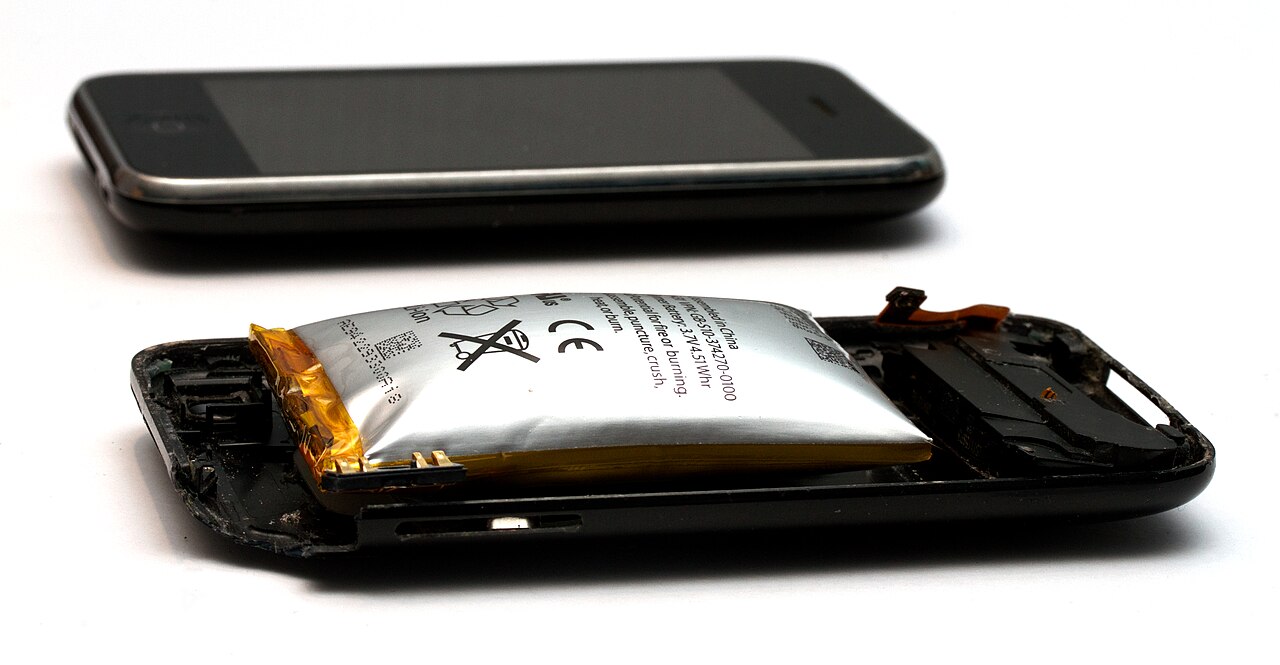
A swollen battery, a lifting screen or back cover, a pungent odor, leakage, or excessive heat while the device is idle are signs to stop using and charging it. Turn off the device if it is safe to do so. Do not press down on raised areas, open the casing, or try to flatten the battery. Seek help from a technician promptly; if smoke appears, do not handle the device and stay away from the smoke.